Trusted by event production teams worldwide
PRODUCT TOUR
Every view your team needs
Directors see the full picture. Stage managers see their cues. Signage operators control every display. One console, six roles.
Complete session control at a glance
See every session, every status, and every operator in one screen. Trigger transitions, send broadcasts, apply delay cascades, and monitor your AI agents — all without leaving the console.
- ✓8-state session machine (PLANNED → LIVE → ENDED)
- ✓One-click delay cascade across all downstream sessions
- ✓Broadcast bar with quick presets for common messages
Your full programme on one horizontal canvas
Switch to Timeline view and see every session across every room plotted on a shared time axis. The NOW marker moves in real time. Spot conflicts, overruns, and gaps instantly.
- ✓Room-by-room horizontal layout with live NOW cursor
- ✓Colour-coded by room for instant spatial orientation
- ✓Toggle between List and Timeline with one click
Drive every display from the console
Register lobby screens, wayfinding displays, and sponsor panels. Set per-display content sequences or push a global override to all screens instantly — no extra software needed.
- ✓Instant display pairing with 6-character codes
- ✓Auto-rotating sequences: sponsors → agenda → schedule
- ✓One-click global overrides for break screens or recall
Speaker-facing countdown your presenters will love
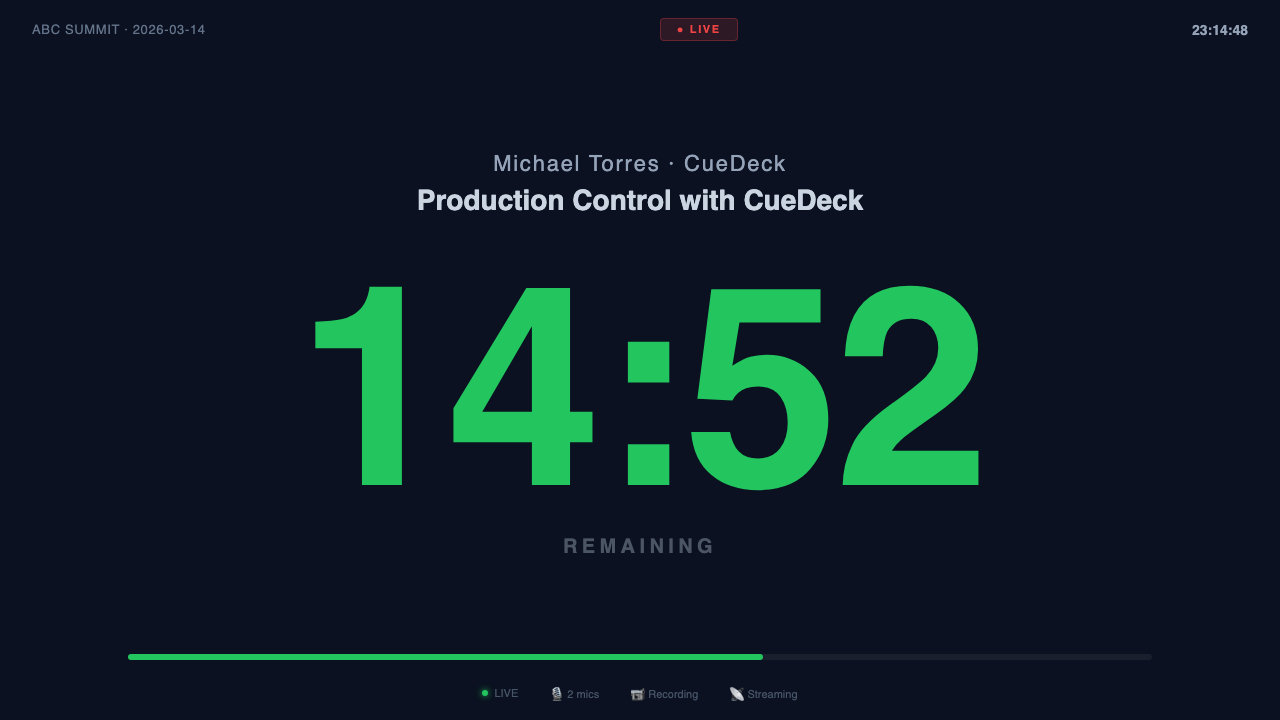
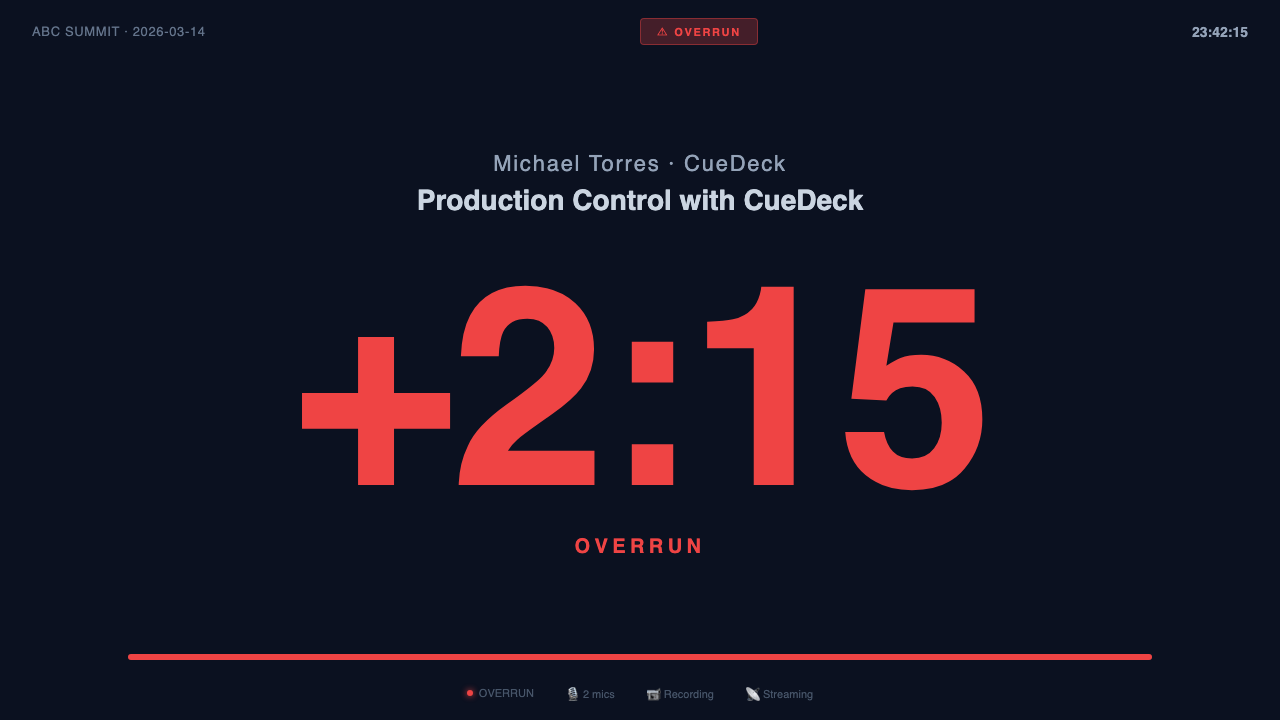
Open the Stage Timer on any screen facing the stage. Speakers see a massive countdown that shifts from green to amber to red as time runs low. If they overrun, the timer flashes red with the overage — no ambiguity, no awkward signals.
- ✓Colour-coded urgency: green → amber → red → flashing overrun
- ✓HOLD freeze keeps the clock paused during breaks or delays
- ✓Progress bar and live session info visible at a glance
Connect screens in seconds, not minutes
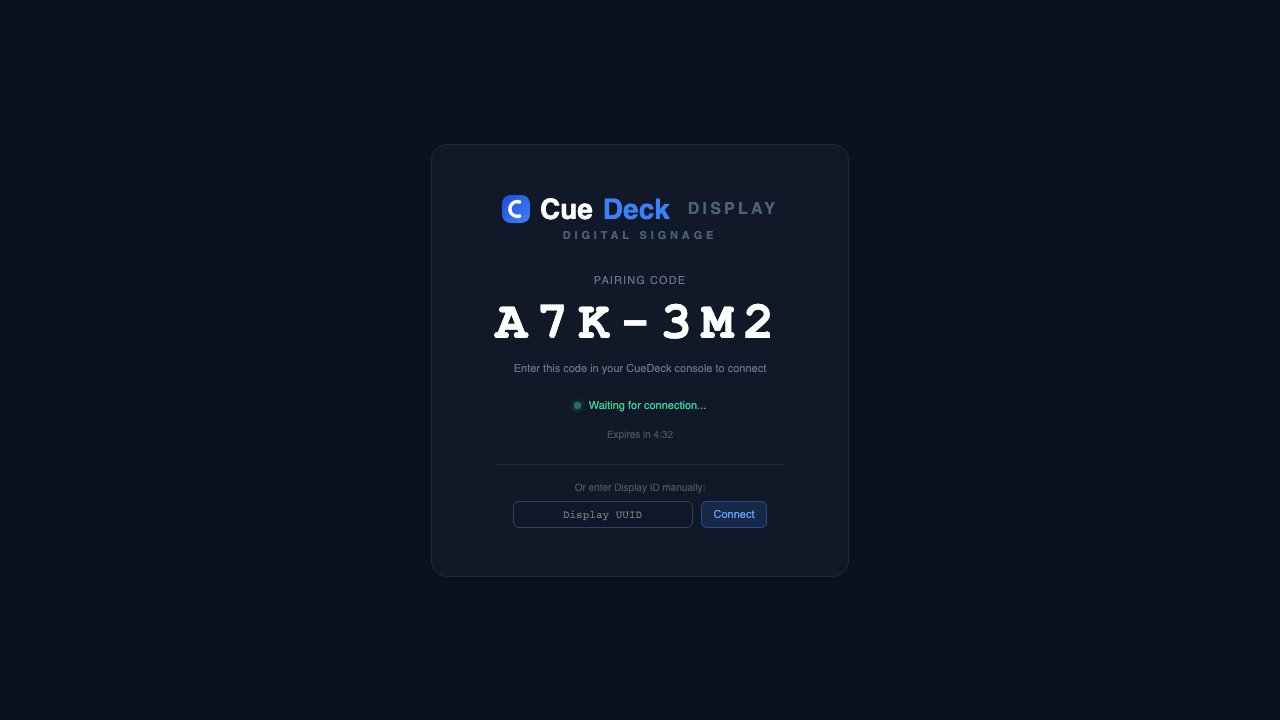
Open app.cuedeck.io/d on any screen — TV, tablet, or monitor. A 6-character pairing code appears. Type it into the console and the screen connects instantly. Install as an app for auto-reconnect on reboot.
- ✓Short URL — just 11 characters to type on a TV remote
- ✓Installs as a fullscreen app — no browser chrome, survives reboots
- ✓Auto-reconnect — paired displays remember their connection
- ✓6-character code with 5-minute auto-expiry for security
FEATURES
Everything your team needs
Built by event producers, for event producers. Every feature solves a real problem from the floor.
Multi-role Operations
Director, Stage, AV, Interp, Reg, and Signage — each role sees exactly what they need, with role-adaptive filters and keyboard shortcuts.
Real-time Sync
Session changes, broadcasts, and clock updates propagate instantly to every operator via live subscriptions. Zero polling.
AI Incident Advisor
When something breaks, get instant AI-generated diagnosis and numbered resolution steps — no scrambling, no guesswork.
Digital Signage
Drive lobby displays, wayfinding screens, and sponsor carousels directly from the console. Auto-rotate sequences, video support.
Delay Cascade
Apply a delay to one session and it cascades downstream automatically. Every operator sees the new schedule instantly.
Post-event Reports
AI-generated executive summary, session-by-session variance analysis, and incidents log — ready to share in one click.
Stage Timer
Full-screen countdown visible from any stage. Colour-coded urgency (green → amber → red), HOLD freeze, OVERRUN flash — speakers always know where they stand.
Display Pairing
Pair signage screens in seconds — each display shows a 6-character code, enter it in the console, done. No network setup, no IP addresses.
HOW IT WORKS
Up and running in minutes
No setup complexity. No training required.
Create your event
Add your sessions, rooms, and team members. Assign roles — each person sees only what's relevant to them. Import from a spreadsheet or build from scratch in minutes.
Go live on the day
Open the console, hit Ready → Call Speaker → Go Live. Every status change propagates instantly across all devices. No refresh needed.
Stay in control
Apply delay cascades, send broadcasts to all operators, manage signage displays, and get AI-powered help if anything goes sideways.
PRICING
Simple, honest pricing
3-day free trial on Starter and Pro. No credit card required.
Pay-per-event
Perfect for freelancers and one-off productions.
- 1 event
- Up to 5 operators
- All 6 roles included
- Real-time sync
- Basic signage (2 displays)
Starter
For small teams running regular events.
- 1 active event at a time
- Up to 5 operators
- All 6 roles included
- Real-time sync
- 5 signage displays
- Post-event reports
Pro
Full power for production companies.
- Unlimited active events
- Up to 20 operators
- All 6 roles included
- Real-time sync
- Unlimited signage displays
- AI Incident Advisor
- AI post-event reports
- Delay cascade
- Priority support
Need more? Contact us for Enterprise pricing.
Insights for event production teams
Frequently asked questions
What is CueDeck?+
CueDeck is a real-time production console for live events. It gives every operator — directors, stage managers, AV techs, interpreters, registration, and signage — a role-based dashboard that updates in under 100 milliseconds.
How does real-time sync work?+
CueDeck uses live database subscriptions via Supabase Realtime. When a director changes a session status, every connected operator sees the update instantly — no polling, no refreshing.
What roles does CueDeck support?+
Six roles: Director (full control), Stage (session transitions), AV (hold capability), Interpreter (read-only language view), Registration (read-only desk view), and Signage (display management).
Do I need to install any software?+
No. CueDeck runs entirely in the browser. Open it on any device — laptop, tablet, or phone. Signage displays work the same way: open app.cuedeck.io/d on any screen and pair with a 6-character code. You can also install the display page as a fullscreen app for auto-reconnect on reboot — no app store required.
Can I use CueDeck for multi-room events?+
Yes. Sessions are assigned to rooms, and operators can filter by room. Signage displays can be configured to show content for specific rooms. The director sees everything across all rooms.
How does digital signage work?+
Register displays from the console, choose a content mode (schedule, wayfinding, sponsors, break screen, and more), and launch the display URL on any browser. Displays update in real time and support global overrides.
What do the AI agents actually do?+
CueDeck includes three AI agents powered by Anthropic's Claude. The Incident Advisor fires automatically when technical warnings are detected and gives your team a diagnosis and step-by-step fix checklist. The Cue Engine sends pre-cue alerts 8 minutes before each session with an AI-generated preparation checklist. The Report Generator produces a full post-event analysis — session variance, incidents log, and improvement recommendations — in one click.
Do I need to set up anything to use the AI features?+
No. AI runs entirely on CueDeck's servers — there is nothing to configure, no API key to manage, and no browser extension to install. As long as you are on a Trial, Pro, or Enterprise plan and logged in, AI features work automatically.
Stay in the loop
Get tips from the production floor
Occasional updates on event operations, product news, and how teams are using CueDeck. No spam.
Ready to start? Create your free account →